m (username removed) (log details removed) |
No edit summary Tag: 2017 source edit |
||
| Line 5: | Line 5: | ||
# Place your cursor where you want the status badge to appear. | # Place your cursor where you want the status badge to appear. | ||
# Open the Content Droplets menu<span class="inline-img">[[File:VE-ContentDroplets.png|alt=Content Droplet menu item of Visual Editor|30x30px]]</span>. | # Open the Content Droplets menu<span class="inline-img">[[File:VE-ContentDroplets.png|alt=Content Droplet menu item of Visual Editor|30x30px|link=none]]</span>. | ||
# Search for "Status Badge". | # Search for "Status Badge". | ||
# Insert the Content Droplet.[[File:Content Droplet StatusBadge.png|alt=Inspector for the Content Droplet|center|thumb|650x650px|Content Droplet "Status badge"]] | # Insert the Content Droplet.[[File:Content Droplet StatusBadge.png|alt=Inspector for the Content Droplet|center|thumb|650x650px|Content Droplet "Status badge"]] | ||
Revision as of 12:14, 20 July 2026
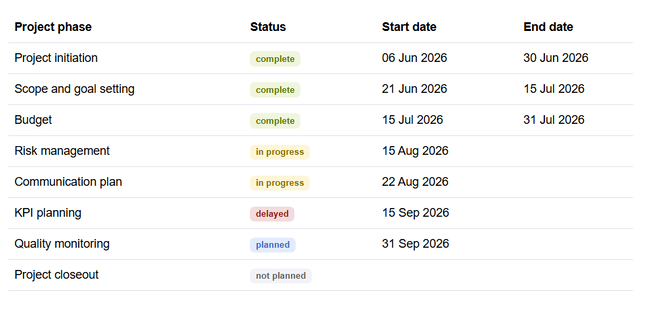
A status badge is specially formatted colored text that indicates the status of an information unit.
Adding a status badge
Status badges are available as a Content Droplet.
- Place your cursor where you want the status badge to appear.
- Open the Content Droplets menu
 .
- Search for "Status Badge".
- Insert the Content Droplet.
Content Droplet "Status badge" - Add your status message.
- Select a color.
- Select "light badge" if you want to show a badge with a light background color (optional).

To quickly add another status badge, you can select the inserted status badge, copy it (Ctrl+c) and paste it somewhere else on the page. Select the duplicated badge and then edit its text and color.
Customizing
If you want to use a larger font-size in your wiki for badges, you can add the following rule to the page MediaWiki:Common.css (admin rights required):
/*status badge */
.status-badge {
    font-size:0.9em; /*default-size:0.75em */
}
Accessibility
Use of color: Make sure to use label text for a status badge that clearly indicates the status. Do not rely on the color alone for conveying the meaning. For example, negative numbers should have a qualifier (-) instead of just being formatted with a red background, for example. WCAG #use-of-color
Screenreaders will read the badge as a combination of badge type ("Status"), color (e.g. "green") and label text: "Status: green, complete".



